
Payment Settings
Payment capabilities are applicable to internal settlements, corporate customer accounts, or compliant service charges in legally authorized scenarios. The deployer should ensure that relevant services, charges, upstream authorizations, and operational methods comply with local laws and regulations, upstream terms of service, platform rules, and payment risk control requirements.
Here you can configure settings related to the top-up function.
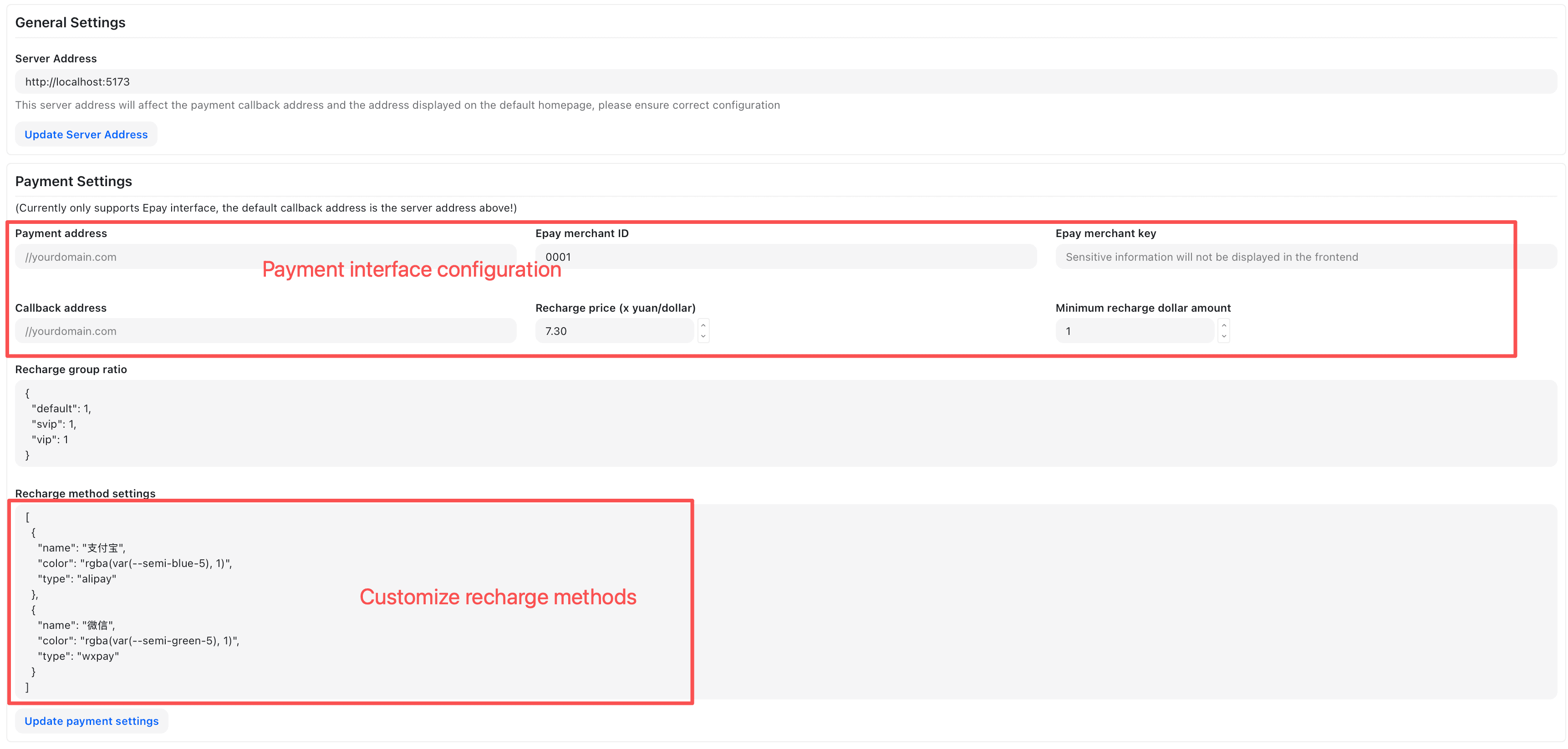

Supported Payment Gateways
- EPay
- Required fields:
API Address,Merchant ID (PID),Merchant Key (KEY) - The platform callback parameters include a signature, which the system will verify and automatically credit.
- Required fields:
- Stripe (Optional)
- Required fields:
API KeyWebHook Signing SecretProduct Price ID
- Required fields:
What is EPay
EPay is a general term for the "third-party aggregated collection gateway/interface" model, not a specific website or company. It can refer to commercial aggregated payment services, as well as self-built/open-source gateway implementations that follow the "EPay protocol style."
- Core Function: Aggregates channels such as WeChat Pay, Alipay, and bank cards, providing merchants with unified order placement, signature verification, and callback interfaces.
- Compliance Note: The gateway itself is not equivalent to a licensed payment institution; fund clearing, settlement, and compliance depend on the licensed channels it connects to. Please comply with local regulatory and risk control requirements.
Top-up Method Settings Template
In "Top-up Methods", you can configure according to the following structure:
[
  {
    "color": "rgba(var(--semi-blue-5), 1)",
    "name": "支付宝",
    "type": "alipay"
  },
  {
    "color": "rgba(var(--semi-green-5), 1)",
    "name": "微信",
    "type": "wxpay"
  },
  {
    "color": "rgba(var(--semi-green-5), 1)",
    "name": "Stripe",
    "type": "stripe",
    "min_topup": "50"
  },
  {
    "name": "自定义1",
    "color": "black",
    "type": "custom1",
    "min_topup": "50"
  }
]
Field Descriptions
- name: Display text. Shown on the "Select Payment Method" button (e.g., "Alipay/WeChat/Stripe/Custom1").
- color: Theme or border color for the button/badge. Supports any CSS color value, it is recommended to use existing design tokens (e.g.,
rgba(var(--semi-blue-5), 1)). - type: Channel identifier, used for backend routing and order placement.
stripe→ Uses the Stripe gateway.- Others (e.g.,
alipay,wxpay,custom1, etc.) → Uses an EPay-style gateway and passes this value as a channel parameter. - Detailed logic can be found in the backend controller
controller/topup.go(Reference: controller/topup.go).
- min_topup: Minimum top-up amount (unit consistent with page currency). When the input amount is less than this value, the page will prompt "The minimum top-up amount for this payment method is X" and restrict initiating payment; the backend will also perform validation.
- Order: Rendered from left to right according to array order.
Top-up Amount Configuration
Custom Top-up Amount Options
Set the top-up amount options that users can choose, for example:
[10, 20, 50, 100, 200, 500]These values will be displayed in the "Select Top-up Quota" area, and users can directly click to choose the corresponding top-up amount.
Top-up Amount Discount Configuration
Set discounts corresponding to different top-up amounts, where the key is the top-up amount and the value is the discount rate, for example:
{
  "100": 0.95,
  "200": 0.9,
  "500": 0.85
}- Key: Top-up amount (string format)
- Value: Discount rate (decimal between 0-1, e.g., 0.95 means 95% of the price, i.e., a 5% discount)
- The system will automatically calculate the actual payment amount and savings based on the configuration.
- The use of discount features should comply with the authorized scope, upstream terms of service, platform rules, and local laws and regulations.
- Detailed implementation logic can be found in the backend controller controller/topup.go
Last updated on